

6 Navratri AI Photo Editing Prompts to Turn Any Selfie Into a Realistic Festive Photo
Copy 6 Navratri AI photo editing prompts for a realistic selfie: Garba night, Dandiya, chaniya choli, Durga Puja and more. Keep your real face in Gemini or ChatGPT image tools.
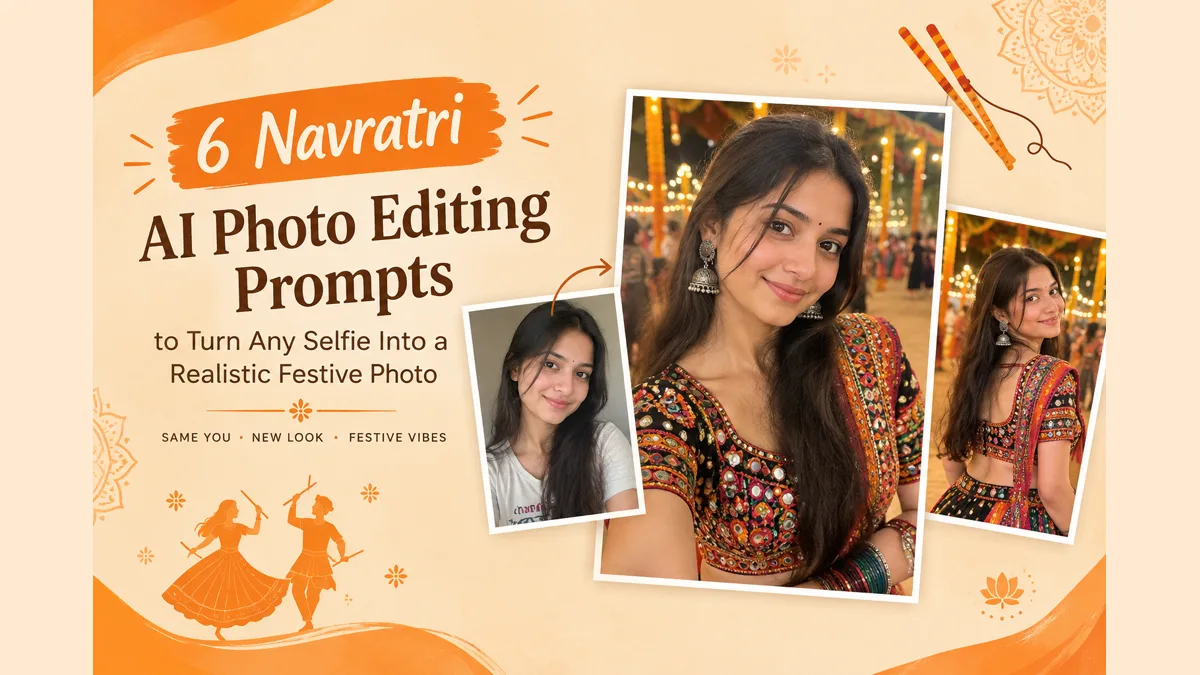
Want a Navratri photo without actually doing a full festive photoshoot?
You can now take a completely normal selfie — even one in a casual T-shirt, top or everyday clothes — and turn it into a realistic Navratri, Garba, Dandiya or festive portrait using an AI photo editor.
The trick isn't simply asking AI to “make this a Navratri photo.”
If you want the result to actually look like you, the prompt needs to tell the AI what to change and what not to change.
Your face should remain yours. Your natural skin texture should remain visible. Your facial proportions, expression and identity should stay consistent. The outfit, jewellery, background and lighting can change around you.
That is exactly what these six prompts are designed to do.
Upload your normal selfie, copy one of the prompts below, and let AI create the festive version.
Important: AI-generated results can vary depending on the original photo and the image tool you use. A clear, reasonably well-lit selfie with your face visible generally gives the editor more information to work with. Current Navratri prompt guides also emphasize face preservation, realistic lighting and specific clothing/background instructions rather than generic “make it festive” commands.
If you liked my AI Ganpati photo prompts, this is the Navratri version: six distinct scenes designed for a real selfie. For everyday and ad edits, use my 50 AI photo editing prompts. For the broader creative workflow, see the AI tools I actually use for digital marketing.
What Makes a Good Navratri AI Photo Prompt?
A good festive photo prompt needs more than an outfit description.
For a realistic result, specify:
- Your identity: Keep my face and facial features unchanged.
- Your natural appearance: Preserve skin tone, skin texture and natural details.
- The outfit: Chaniya choli, saree, kurta, kediyu, etc.
- The accessories: Jhumkas, bangles, oxidised jewellery, dupatta, dandiya sticks.
- The location: Garba ground, decorated courtyard, temple, Durga Puja pandal, etc.
- The lighting: Match the lighting to the environment.
- The photography: Natural shadows, realistic depth of field and believable perspective.
- The things to avoid: Plastic skin, face reshaping, excessive beauty filters, distorted hands and unrealistic clothing.
This is particularly important because the current wave of Navratri AI-photo content is built around transforming ordinary selfies into festive portraits while keeping the person recognizable.
1. Classic Navratri Chaniya Choli Photo
For the traditional festive look
This is the prompt to try if you want your regular selfie to look like it was actually taken at a Navratri celebration.
The outfit uses traditional mirror work, colourful embroidery and oxidised jewellery, all of which remain popular directions for Navratri styling in 2026.
Copy-Paste Prompt: tap Copy prompt, then paste it into an image-editing tool that accepts your selfie as a reference.
Edit my uploaded photo into a realistic Navratri festive portrait. Keep my exact face, facial structure, facial features, skin tone, natural skin texture, eyes, nose, lips, jawline and overall identity unchanged. Do not beautify, reshape, smooth or replace my face. Keep me recognisably the same person. Change only my clothing and surroundings. Dress me in a traditional Gujarati chaniya choli with detailed mirror work, colourful thread embroidery, a flowing flared skirt, fitted choli and an elegant dupatta. Add realistic oxidised silver jhumkas, bangles and subtle traditional jewellery. Place me at a beautifully decorated Navratri venue with warm string lights, subtle marigold decorations and a realistic festive atmosphere in the background. Make the lighting naturally match the environment and the original direction of light on my face. Preserve realistic skin pores and natural facial texture. Keep realistic body proportions and natural clothing folds. The final image should look like a genuine photograph taken on a good smartphone or professional camera during Navratri, not an AI-generated image. Natural photography, realistic shadows, realistic fabric texture, authentic Indian festive styling, natural depth of field, sharp face, softly blurred background. No beauty filter, no plastic skin, no excessive glow, no face reshaping, no cartoon effect, no artificial skin smoothing, no unrealistic jewellery, no distorted hands, no extra fingers, no text, no watermark.
Try These Outfit Variations
Mirror Work: Black and rust chaniya choli with colourful mirror work.
Colourful: Multicoloured chaniya choli with a bright embroidered dupatta.
Elegant: Deep maroon or navy chaniya choli with subtle mirror detailing.
Minimal: Pastel chaniya choli with light embroidery and delicate jewellery.
2. Garba Night Photo Prompt
Turn your selfie into a real Garba-night moment
Want the photo to look less like a studio portrait and more like you were actually standing at a Garba night?
Use movement, warm lights and a realistic event environment.
Garba and Dandiya are among the strongest recurring visual themes in current Navratri AI-photo searches, while current fashion coverage also highlights the importance of outfits that work visually under long-night event lighting.
Copy-Paste Prompt
Use my uploaded selfie as the exact identity reference. Keep my face completely unchanged and recognisable. Preserve my natural facial features, skin tone, skin texture, eyes, nose, lips, face shape and natural expression. Do not replace or redesign my face. Transform my casual clothing into a stylish traditional Navratri chaniya choli with authentic Gujarati mirror work, colourful embroidery and a flowing dupatta. Add realistic oxidised silver earrings, bangles and subtle festive jewellery. Place me at a real outdoor Garba night celebration. Surround me with softly blurred warm festival lights, subtle decorative elements and a realistic crowd in the far background. Create the feeling of a lively Garba venue without making the background look digitally generated. Give me a natural Garba pose with realistic body positioning and clothing movement, as if the photograph was captured during the dance. Match the lighting on my face and body to the warm festival lights. Preserve natural skin texture and realistic shadows. Make this look like an authentic candid photograph captured during a real Garba night using a modern smartphone camera. Realistic colours, natural contrast, realistic fabric movement, authentic Indian festive atmosphere. Do not apply a beauty filter. Do not change my face. Do not make my skin overly smooth or glowing. No plastic skin, no cinematic fantasy effect, no cartoon look, no artificial face, no distorted hands, no extra fingers, no unrealistic background, no text, no watermark.
Make It More Realistic
Instead of asking for a huge crowd, try:
“A few softly blurred people dancing in the background.”
It often makes the image feel more like a real photograph than a poster.
3. Dandiya Night Photo Prompt
The energetic one
If you want something more dynamic, add dandiya sticks and a natural dance pose.
The important part is not simply adding sticks. AI needs to understand where the hands, arms and sticks should be positioned.
Copy-Paste Prompt
Edit my uploaded photo into a realistic Dandiya night photograph while keeping my real identity completely unchanged. Preserve my exact facial structure, facial features, skin tone, skin texture, eyes, nose, lips, hairstyle and natural proportions. Do not alter or beautify my face. Dress me in an authentic Gujarati Dandiya outfit with a richly embroidered chaniya choli, colourful mirror work, a lightweight dupatta, oxidised silver jewellery, jhumkas and stacked bangles. Place me at a real Dandiya night event after sunset. Give me two traditional decorated wooden dandiya sticks held naturally in my hands, with realistic hand placement and believable arm positioning. Capture me in a natural mid-dance pose, as if someone has taken a candid photograph while I am playing Dandiya. Add warm hanging lights, subtle colourful decorations and a realistic festival crowd softly out of focus in the background. Match the lighting, shadows, perspective and colour temperature across my face, clothing and background. Preserve natural skin texture and realistic fabric folds. Make the final image look like a real photograph taken during a Dandiya celebration, not an AI artwork. No face modification, no skin smoothing, no beauty filter, no artificial glow, no fantasy lighting, no cartoon effect, no distorted hands, no extra fingers, no duplicated dandiya sticks, no floating objects, no unrealistic anatomy, no text, no watermark.
Quick Variations
Candid: Looking slightly away from the camera while dancing.
Portrait: Holding the dandiya sticks near shoulder level.
Action: Captured during a turn with the dupatta naturally moving.
Friends: Add one or two realistically positioned people in the background.
4. Durga Puja Pandal Photo Prompt
A different festive mood
Not everyone celebrates Navratri through Garba.
If you want a Durga Puja-inspired festive portrait, change the visual language completely.
Think traditional saree styling, a decorated Puja environment, flowers, lamps and a more devotional atmosphere rather than a Garba dance floor.
This distinction matters: Durga Puja and Garba are different cultural celebrations, so combining every festival element into one image can make the result look artificial or culturally confused. Current AI prompt guides are increasingly separating Garba/Navratri scenes from Bengali Durga Puja settings for exactly this reason.
Copy-Paste Prompt
Use my uploaded photo as the exact reference for my identity. Keep my face, facial structure, facial features, skin tone, skin texture, eyes, nose, lips and natural expression unchanged. Do not reshape, beautify or replace my face. Transform my casual outfit into an elegant traditional Bengali festive saree suitable for Durga Puja. Dress me in a rich red-and-white saree with authentic Bengali styling, a traditional blouse, subtle gold jewellery, elegant earrings and a small traditional bindi. Place me inside a beautifully decorated Durga Puja pandal with realistic floral decorations, warm lamps, subtle festive details and a beautifully decorated Durga idol softly visible in the background. Keep the environment authentic and elegant rather than overly dramatic. The background should have realistic depth and natural photographic blur. Match the lighting from the pandal naturally onto my face and clothing. Preserve my natural skin texture, facial details and body proportions. The final result should look like a real photograph taken during Durga Puja on a modern smartphone or professional camera. No artificial beauty filter, no face reshaping, no plastic skin, no excessive makeup, no fantasy glow, no cartoon effect, no unrealistic idol, no distorted hands, no extra fingers, no text, no watermark.
Want a More Traditional Look?
Try adding:
“Traditional Bengali hairstyle with a neat bun decorated with white flowers.”
Or:
“Subtle red sindoor-style festive detailing only if naturally appropriate to the person in the original photo.”
5. Royal Gujarati Navratri Portrait
For a more premium Instagram-style photo
Want your selfie to look like you had an actual festive photoshoot?
Go for a heritage courtyard + traditional outfit + natural photography combination.
Current 2026 Navratri fashion coverage shows a mix of traditional mirror work, Bandhani-inspired details and contemporary silhouettes, so this style can feel festive without looking like a costume.
Copy-Paste Prompt
Transform my uploaded selfie into a realistic premium Navratri portrait while preserving my exact identity. Keep my face, facial structure, facial features, skin tone, natural skin texture, eyes, nose, lips, hairstyle and body proportions unchanged. I must look exactly like the person in the original photograph. Dress me in a sophisticated Gujarati chaniya choli in deep wine, rust, black and muted gold tones, featuring authentic mirror work, detailed embroidery and subtle traditional patterns. Add elegant oxidised jewellery, statement jhumkas, bangles and a beautifully draped dupatta. Place me in an old heritage-style Indian courtyard decorated with marigold flowers, traditional lamps and subtle festive decorations. Create natural warm evening light coming from the surrounding lamps while keeping my face naturally exposed and realistic. Add soft background depth without making the image look cinematic or heavily edited. The photograph should look like a real fashion photograph taken during Navratri, with authentic fabric texture, realistic jewellery reflections, natural shadows and believable perspective. Preserve natural skin pores and small facial details. Keep the original personality and expression of the person. No skin whitening, no face slimming, no beauty filter, no excessive makeup, no artificial glow, no unrealistic eyes, no plastic skin, no fantasy background, no cartoon effect, no distorted hands, no text, no watermark.
6. Simple Daytime Navratri / Temple Look
Because not every Navratri photo needs neon lights
If you want something more natural, try a daylight festive portrait.
This is particularly useful if your original selfie was taken indoors or in casual clothes and you want the result to feel like a genuine daytime festival photograph.
Copy-Paste Prompt
Use my uploaded selfie as the exact reference and create a realistic daytime Navratri photograph. Keep my face completely unchanged. Preserve my exact facial features, face shape, skin tone, natural skin texture, eyes, nose, lips, hairstyle and identity. Do not beautify, reshape or replace my face. Change my casual clothing into an elegant traditional Indian festive outfit suitable for Navratri. Dress me in a colourful chaniya choli with subtle mirror work, delicate embroidery and a lightweight dupatta. Add small traditional earrings, bangles and simple festive jewellery. Place me outside a beautifully decorated Indian temple or festive courtyard during daytime, with marigold flowers, subtle rangoli, traditional decorations and a few natural background elements. Use soft natural morning or late-afternoon sunlight. Keep realistic shadows on my face and clothing. Preserve natural skin texture, realistic fabric folds and authentic colours. Make the photograph look like a genuine picture taken on a modern phone camera during Navratri. The image should be warm, natural and festive without looking edited. No beauty filter, no skin smoothing, no face reshaping, no artificial glow, no excessive saturation, no cinematic colour grading, no fantasy effect, no cartoon appearance, no distorted anatomy, no extra fingers, no text, no watermark.
The Secret to Making AI Navratri Photos Look Real
Most people focus on the outfit.
That's only half the prompt.
The bigger difference comes from telling the AI how the new environment should interact with the original photograph.
For example:
Instead of:
“Put me in a Garba night.”
Try:
“Match the warm festival lighting to the existing direction of light on my face and create realistic shadows on the clothing.”
Instead of:
“Make me beautiful.”
Try:
“Preserve my natural facial features, skin texture and original expression.”
Instead of:
“Add dandiya sticks.”
Try:
“Place two decorated wooden dandiya sticks naturally in my hands with anatomically correct grip and realistic perspective.”
Instead of:
“Make it cinematic.”
Try:
“Make it look like a genuine photograph captured during a real festival.”
The second version gives the image editor specific visual instructions instead of a vague aesthetic direction.
Universal “Keep My Face Real” Instruction
If your AI-generated photo keeps changing your face, add this paragraph to the end of any prompt:
IMPORTANT: Treat my uploaded photo as the primary identity reference. Preserve my exact facial identity and natural appearance. Do not modify my facial structure, eyes, nose, lips, jawline, skin tone, age or natural expression. Do not apply beauty filters or facial enhancement. Keep natural skin pores, fine details and realistic imperfections. Only change the clothing, environment and other elements specifically requested in this prompt. The final image must still look like a real photograph of me.
This is one of the most useful additions because “make me look like Navratri” and “change my outfit while keeping my identity” are two very different instructions.
What Photo Should You Upload?
You don't need a professional photoshoot.
A normal selfie can work.
For the most consistent result, choose a photo where:
- Your face is clearly visible
- Your face isn't heavily covered
- The photo isn't extremely blurry
- Your original lighting isn't too dark
- Your facial features aren't hidden by sunglasses
- Your head isn't cropped
- You aren't using an extreme beauty filter
- The camera angle isn't extremely distorted
You can even start with a normal everyday selfie.
The whole idea of these prompts is to change the context around you, not replace you.
Current Navratri prompt guides similarly recommend a clear, front-facing source photo because the quality and visibility of the reference image affect how consistently the AI preserves identity.
Don't Want a Chaniya Choli?
You can swap the outfit instruction in any prompt.
For women
Try:
- Traditional Gujarati chaniya choli
- Mirror-work lehenga
- Bandhani-inspired chaniya choli
- Contemporary festive lehenga
- Traditional saree
- Bengali saree for Durga Puja
- Indo-western festive outfit
- For men
Try:
- Traditional Gujarati kediyu
- Embroidered kurta
- Kurta with colourful waistcoat
- Kediyu with dhoti
- Contemporary Gujarati festive outfit
Navratri fashion in 2026 is also moving beyond one fixed silhouette, with traditional mirror work appearing alongside contemporary cuts and fusion styling.
5 Negative Instructions That Can Save Your Photo
If your generated image looks too “AI,” add these:
1. No plastic skin — Keep realistic pores and natural skin texture.
2. No face replacement — Preserve the exact identity from the uploaded photo.
3. No fake lighting — Match the lighting direction and colour temperature naturally.
4. No AI hands — Maintain anatomically correct hands and fingers.
5. No fantasy effect — Make the final image look like an authentic photograph, not digital artwork.
Which Navratri Prompt Should You Try First?
If you're uploading a normal selfie, start with the Classic Chaniya Choli prompt.
If you want an Instagram-style festive picture, try Garba Night.
If you want an action shot, use Dandiya Night.
If you're celebrating Durga Puja, use the Durga Puja Pandal prompt rather than mixing it with Garba elements.
If you want a premium-looking portrait, choose the Royal Gujarati version.
And if you prefer something subtle and natural, try the Daytime Navratri prompt.
Final Tip: Don't Over-Edit the Result
The biggest mistake after getting a good AI photo is adding another layer of filters.
If your goal is a photograph that looks real, leave some imperfections in.
Natural skin texture.
Natural shadows.
Natural hair.
Natural fabric folds.
A slightly imperfect expression.
A believable background.
That's what makes the final image feel like a photo you actually took, rather than an AI image.
So upload your normal selfie, choose your favourite festive look, copy the prompt and let the AI change the celebration — not you.
Making visuals for a campaign rather than a personal post? Read how content marketing works in 2026, or explore my performance marketing and content work.
Save These Prompts for Navratri 2026
Save these prompts before the celebrations begin so you have time to test your photo, outfit and lighting.
Save this page before the celebrations begin, send it to your Garba group and try a different festive look for each night.
One selfie. Six festive looks. No photoshoot required.
FAQs
Can I use a normal selfie for a Navratri AI photo?+
Yes. A normal, reasonably clear selfie can be used as the reference image. The AI can change the clothing, background and festive setting while being instructed to preserve your facial identity.
Which AI tool can I use for these Navratri prompts?+
These prompts are written as general image-editing instructions and can be adapted for image-generation/editing tools that accept an uploaded reference photo, including tools such as ChatGPT and Gemini. Current Navratri prompt content is also targeting both platforms.
How do I make my AI Navratri photo look real?+
Tell the AI to preserve your facial identity and natural skin texture, then specify realistic lighting, shadows, fabric texture, perspective and background depth. Avoid vague instructions such as “make it cinematic” or “make me beautiful.”
Can I change my clothes from a normal T-shirt to a chaniya choli?+
Yes. Explicitly tell the image editor to replace the clothing while keeping your face and identity unchanged.
Can I create a Dandiya photo from a selfie?+
Yes. Add a specific Dandiya pose, realistic hand positioning and two correctly positioned dandiya sticks to the prompt.
Can I use these prompts for boys?+
Absolutely. Replace the chaniya choli instruction with a Gujarati kediyu, embroidered kurta or traditional festive outfit while keeping the identity-preservation instructions unchanged.
Can I create a Durga Puja photo with these prompts?+
Yes, but use a culturally appropriate Durga Puja setting, such as a decorated pandal, Bengali saree styling and traditional festive details rather than combining it with a Garba ground or Dandiya sticks.
Why does AI sometimes change my face?+
Image-editing models may reinterpret parts of the reference image when the prompt asks for major changes. A clear source image and explicit instructions to preserve facial structure, skin tone, natural texture and identity can help reduce unwanted changes. Results still vary between tools and individual images.
Keep reading
Written by Likita
Digital marketing, creative strategy, content & AI — Asia, UAE & Europe.